


Decorise AI, Design Your Space
4.20.00 Reviews
App Specs
- Version
- 1.4
- Updated On
- License
- Free
- Downloads
- 10,000+
- Developer
- Bilge Bulut Mobile
- Categories
- House & Home
- Platform
- Android
Screenshots
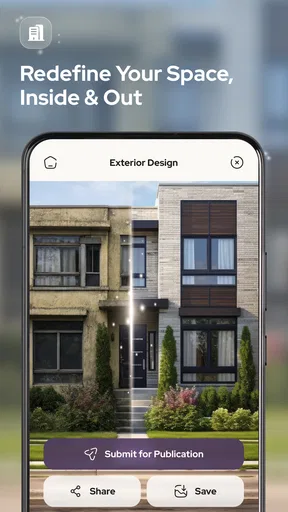
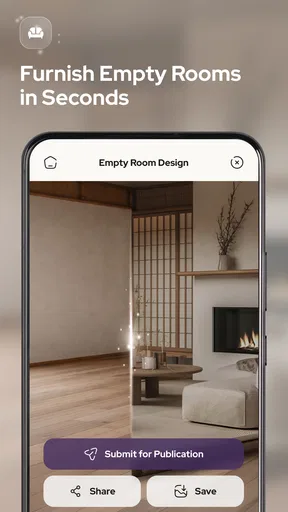
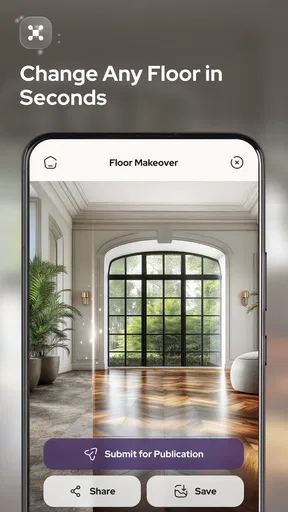
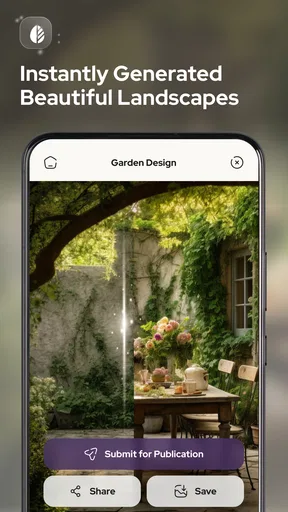
 Analysis by AppCompare
I opened Decorise AI with a very ordinary problem in mind: a room that worked, but did not feel finished. I wanted ideas before moving furniture, buying paint, or sending a vague message to someone who might help. That is where this House & Home app makes sense. It turns a starting image or design brief into a visual direction, covering interiors, exteriors, and gardens rather than concentrating on just one room.
My first impression was that its value is not in replacing an architect, decorator, or builder. It is better understood as a fast idea generator. When I am stuck between a warmer living room and a cleaner modern look, seeing a possible direction is more useful than reading a long list of style names. The app gives that early conversation something concrete to react to.
Bilge Bulut Mobile is the developer behind the app, and the current version is 1.4. It is free to install, with optional in-app purchases ranging from $4.99 to $39.99 per item. That combination makes it easy to test the basic experience before deciding whether the extra paid options fit the way I plan to use it.
From an untidy starting point to a usable design direction
I use a clear starting point to make a design app more useful: choose one thing I want to change, such as the room’s mood or the garden’s sense of privacy, before exploring images. That keeps the next step focused on whether a concept helps with that decision, rather than whether it simply looks polished.
What I would prepare before opening the app
The quality of an AI design result begins before the first generation. A dark, crooked photo with laundry on the floor gives the app less to work with than a clear image taken from the doorway. I found it helpful to decide what I actually wanted from the session: a new color mood, a different furniture style, a more convincing exterior, or ideas for an empty garden.
This small preparation step prevents a common mistake. If I ask for “a beautiful room,” I may receive an attractive image that does not solve my problem. If I define the problem more narrowly, the output becomes easier to judge. For example, I might be looking for a calmer reading corner, a brighter small bedroom, or a garden layout that feels less bare. The app works best when I use it to explore a decision, not when I expect it to make every decision for me.
I also keep practical constraints in mind. An AI image can suggest a style, but it does not automatically turn that suggestion into a shopping list, a construction plan, or a guarantee that a sofa will fit through the door. That distinction matters throughout the workflow.
Worth Reading Before You Choose

Flipboard Shows What News Apps Must Do Beyond the Feed

Switching to Android Auto Means Rethinking Your Driving Routine

Google Calendar Makes a Crowded Week Easier to Manage

Ludo King Makes the Most of the Minutes Between Plans

Baby Panda World Brings Quick Play to Modern Phones, but Its Game Library Feels Busy

ESPN’s Live Game View Makes Following Close Games Easier
Step one: choosing the kind of space
The broad scope is one of the app’s strongest points. I can approach it from the inside out, beginning with a bedroom, lounge, kitchen, or another interior space, or I can think about the outside of the property. Garden ideas are especially useful when the area is difficult to imagine as a finished place. A blank patch of ground can be hard to plan from words alone, while a visual concept gives me a starting point for discussing planting, seating, paths, and atmosphere.
Exterior work needs a little more caution than a purely decorative room refresh. The image may help me compare a contemporary facade with a more traditional one, but it does not replace checks for local rules, drainage, structural condition, weather exposure, or the materials already used on the property. I treat the result as a mood board with spatial hints, not as technical advice.
Step two: supplying an image or a clear brief
The handoff from my real space to the app is where expectations need to be managed. A photo captures a particular angle, lighting condition, and amount of visible furniture. The generated design may change those details while preserving the general idea of the room. That can be exciting, but it can also make a result look more like a new interpretation than a faithful renovation preview.
For a useful comparison, I would keep the original image available and examine the generated result beside it. I look first at the things that should remain stable: the position of doors and windows, the approximate proportions, and the main circulation path. Then I judge the creative changes. If the room looks stylish but the window has moved or the seating blocks the entrance, I would save the color and material ideas while rejecting the layout.
For users without a suitable photo, a written description can still be a useful way to explore a look, but it naturally gives less certainty about the actual room. This is one of the app’s important trade-offs: visual inspiration is fast, while accurate planning requires more information than a single concept image usually contains.
Step three: comparing directions instead of chasing one perfect image
I get more value from making the app part of a comparison process. Rather than asking for one final answer, I would create a few distinct directions: perhaps warm natural materials, a restrained contemporary palette, and a more colorful option. The point is not to collect endless variations. It is to reveal which choices keep appearing in my own preferences.
A practical technique is to change one major variable at a time. If I alter the style, color, furniture mood, and lighting all at once, I cannot tell what made the result appealing. Keeping most of the brief stable while changing the atmosphere gives me a clearer handoff to the next decision. I can say, “I prefer the layout from one direction and the lighting from another,” instead of simply saying that one image looks nicer.
This is also where the app feels more useful than scrolling through unrelated inspiration boards. A general image search may show beautiful rooms, but those rooms belong to other homes. Decorise AI keeps the exploration connected to my own starting condition, at least conceptually, which makes the discussion more focused.
Step four: turning an image into a conversation
The generated result is most valuable when I use it to ask better questions. Do I like the wall color, or do I only like the brighter lighting? Is the furniture arrangement realistic for the way people walk through the room? Would the garden still work when it is wet, shaded, or being used by children? Does the exterior idea fit the neighboring properties and the existing roof?
These questions create the next handoff: from the app to my own judgment, a partner, a decorator, a contractor, or a retailer. I would save the strongest concepts and annotate them with short notes about what should stay and what should change. That prevents an attractive image from becoming an overly broad instruction such as “make it like this.”
A realistic everyday workflow
Imagine I am preparing a spare bedroom for a family member. The room is narrow, the furniture is mismatched, and I am unsure whether to make it a calm guest room or a flexible office. I would begin with a clear room image, identify the main constraint, and explore two or three visual directions. One might emphasize a compact desk, another a comfortable bed area, and a third a softer hotel-like atmosphere.
After comparing the results, I might discover that the real preference is not a particular style but better storage and less visual clutter. I would then take that conclusion to a furniture retailer or decorator. The app has not measured the room or selected a product, but it has helped me explain the goal. That is a meaningful outcome because many home projects stall at the stage where the owner knows something feels wrong but cannot describe the desired change.
For a garden, the same workflow starts with a different question. Instead of asking only for a pretty outdoor scene, I would decide whether the priority is seating, privacy, low maintenance, entertaining, or making a small area feel larger. The visual result can then be judged against that purpose. A lush concept may look appealing but be unsuitable if I want minimal upkeep.
Where the handoffs become difficult
The app can hand me a visual idea, but several important handoffs still require human checking. Moving from an image to real purchases involves dimensions, availability, materials, colors under actual lighting, and the budget for installation. Moving from an exterior concept to work on a property involves construction knowledge and possibly permissions. Moving from a garden image to planting requires attention to climate, soil, sunlight, and maintenance.
This is not a criticism unique to AI; it is simply the boundary between inspiration and implementation. I would not send a generated image directly to a builder as a complete specification. I would use it to explain the atmosphere, then confirm every practical detail separately.
There is another subtle handoff: the app’s interpretation of my request. AI can make a confident-looking choice that I did not intend. If I ask for a “minimal” interior, the result may remove useful storage or make the room feel empty. If I ask for a “luxury” exterior, it may emphasize decorative surfaces rather than durable materials. I therefore read the image as a proposal, not as proof that the app understood every nuance.
What the result is genuinely good at
The strongest result is a faster first draft. I can move from uncertainty to a recognizable visual direction without spending an evening collecting disconnected examples. That is particularly helpful for people who understand what they like when they see it but struggle to describe it from scratch.
It is also useful for testing a bold idea with low commitment. I can explore a dark wall, a different facade mood, or a more structured garden before buying anything. This reduces the emotional risk of making a change based only on imagination. Even when I reject the exact image, I may learn that I prefer warmer wood, fewer decorative elements, or a more open arrangement.
Another strength is the coverage of three connected areas: interior, exterior, and garden thinking. A home can feel disjointed when each area is planned separately. Using one visual exploration tool for the property as a whole encourages me to consider whether the front of the house, living spaces, and outdoor area share a coherent character.
What I would not trust the result to decide
I would not use the app alone to confirm whether furniture fits, whether a wall can be removed, whether a surface is suitable for outdoor use, or whether a plant will survive in a particular location. Those questions need measurements or specialist advice. The generated image may hide radiators, outlets, pipes, uneven floors, existing trees, or access problems.
I would also be careful with color decisions. Screens vary, and an AI rendering can make a shade appear more dramatic than it will look in daylight. Before committing to paint, flooring, upholstery, or exterior finishes, I would inspect real samples in the space at different times of day. The app can help narrow the palette, but the final choice should happen in the physical environment.
For a highly technical renovation, a dedicated planning tool or a professional consultation is the better choice. Those alternatives may feel slower, but they are designed around measurements, documentation, and feasibility rather than rapid visual exploration. Decorise AI is strongest earlier in the process, when the main need is direction.
Cost, access, and who should try it
The app is free, which lowers the barrier for someone who simply wants to test the concept. Optional purchases are available from $4.99 to $39.99 per item, so I would check what I am unlocking before paying and decide whether I need repeated design exploration or only a quick source of ideas. For an occasional room refresh, the free starting point may be enough to judge whether the workflow suits me.
Its Everyone age rating makes it approachable for household planning, including a shared session where family members compare ideas. Still, younger users should understand that attractive images are not automatically safe or practical plans. The same applies to any adult user who is tempted to treat a visual result as a construction instruction.
The app has an average rating of 4.2 from around 40 ratings and has passed 10 thousand installs. Those figures suggest that it has found an audience, but I would not treat them as a substitute for trying it with my own room. Home design is personal, and the usefulness of an AI result depends heavily on the starting image, the brief, and how critically I review the output.
Who will get the most from it
I would recommend it to renters who want to explore reversible changes, homeowners collecting ideas before speaking with a professional, and anyone who finds traditional inspiration searches too disconnected from their own space. It is also a good fit for a couple or family that keeps disagreeing about style; comparing visual directions can make the discussion more concrete and less subjective.
It can help small business owners think through a reception area, studio, or outdoor frontage, provided they treat the result as an early concept. The ability to explore an atmosphere quickly is useful when the business owner needs to communicate a feeling before working through the details with a designer.
I would suggest skipping it if the immediate requirement is a measured floor plan, an accurate renovation estimate, a compliance decision, or a precise list of products. I would also skip it if I already have a clear design and only need technical execution. In those situations, a measurement-based planner, a retailer’s room tool, or a qualified professional is likely to be more efficient.
My final take on the complete workflow
Decorise AI works best as the first link in a longer chain: real space, visual experiment, personal selection, practical checking, and finally a purchase or professional plan. Its most useful contribution is the transition from “I want this room to feel different” to “these are the colors, materials, and mood I want to investigate.” That is a smaller promise than complete home design, but it is a genuinely useful one.
I like the app because it encourages action without demanding an immediate commitment. I can test an interior, exterior, or garden direction, notice what feels right, and carry that insight into the next conversation. The friction appears when I expect the image to preserve exact architecture or answer technical questions; that is where the workflow breaks and another tool becomes necessary.
For me, the sensible way to use it is to create a few focused concepts, compare them against the original space, write down the decisions hidden inside the images, and verify those decisions in real life. If you approach it that way, Decorise AI is a practical visual starting point rather than a magic renovation button. I would recommend giving it a try when the problem is uncertainty, while keeping a professional or measurement-based alternative ready for the moment inspiration needs to become a buildable plan.
Pros
- Generates room concepts quickly from photos or text prompts.
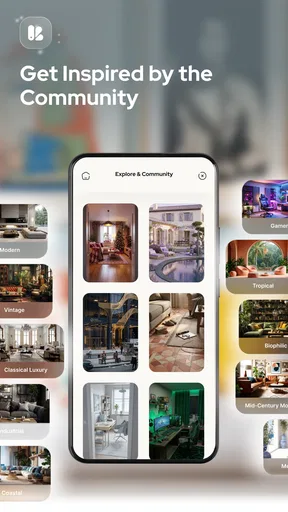
- Offers multiple interior styles for varied design inspiration.
- Useful for visualizing renovations before buying furniture or décor.
- Simple interface makes experimentation accessible to non-designers.
- Can help create mood boards and share ideas with others.
Cons
- AI results may distort room dimensions
- windows
- or furniture details.
- Some advanced styles or features may require a paid subscription.
- Generated designs can include unavailable or impractical products.
- Results may vary significantly depending on photo quality and prompts.
- Privacy concerns may arise when uploading photos of your home.
FAQs for Decorise AI, Design Your Space
What is Decorise AI, Design Your Space?
Decorise AI, Design Your Space is an interior-design app that uses artificial intelligence to help you visualize new ideas for rooms and living spaces. You can typically upload a photo of an existing room, choose a design style or theme, and receive an AI-generated makeover. It is intended for inspiration and planning rather than replacing professional architectural or construction advice.
How does Decorise AI redesign a room?
The process generally begins with uploading or taking a clear photo of the room you want to transform. After selecting a preferred style, such as modern, minimalist, Scandinavian, or traditional, the app processes the image and creates a redesigned version. Results can vary depending on lighting, camera angle, room clutter, and how clearly the original space is captured.
Is Decorise AI free to use?
Decorise AI may offer free features, limited design generations, or a trial period, while advanced styles, higher-quality results, faster processing, or unlimited use may require an in-app purchase or subscription. Before confirming payment, check the current pricing, renewal terms, and trial conditions in the App Store or Google Play listing, since these details can change.
Can I use Decorise AI designs for real renovation projects?
The images produced by Decorise AI can be useful for collecting ideas, comparing color palettes, and discussing furniture or decoration concepts with a designer. However, the generated layouts may not reflect accurate measurements, structural limitations, electrical requirements, or product availability. Always verify dimensions and consult a qualified professional before beginning construction or making expensive purchases.
What should I know about privacy when uploading room photos?
Before uploading photos, review Decorise AI’s privacy policy and the permissions requested by the app. Room images may be processed on remote servers to generate designs, and the handling, storage, or deletion of those images depends on the developer’s policies. Avoid including people, personal documents, addresses, or other sensitive information in photographs unless you understand how the data is used.


